TL;DR — What This Guide Covers
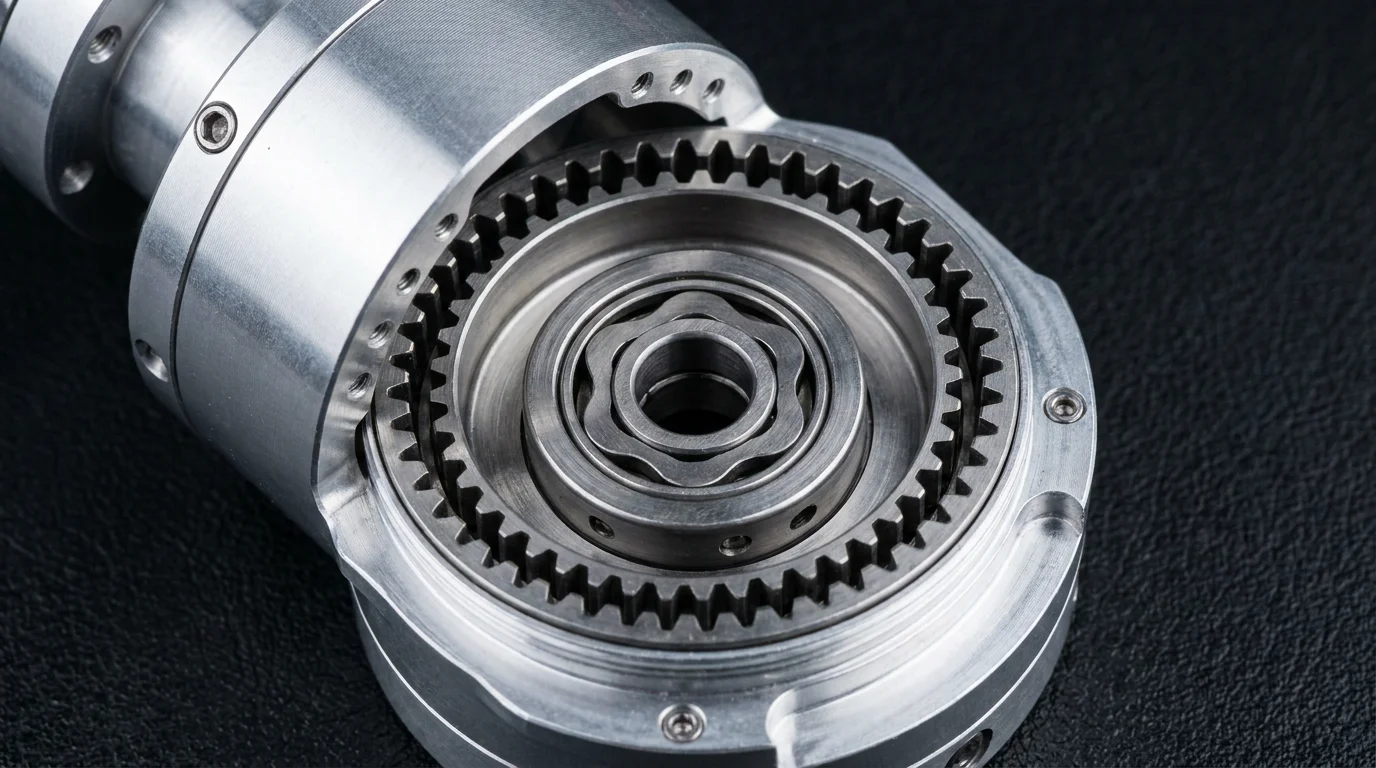
- 1. What is a robot joint module? (for absolute beginners)
- 2. The 5 key specs you need to understand: torque, speed, diameter, encoder resolution, and protocol
- 3. How to size joints for a 3–6 axis arm (with worked examples)
- 4. PP-series recommendations for small, medium, and large DIY builds
- 5. Wiring, controllers, and getting your first axis to move
What Is a Robot Joint Module?
If you have ever tried to build a robotic arm from scratch, you know the pain: sourcing a motor, gearbox, encoder, brake, and driver separately — then spending weeks just making them talk to each other. A robot joint module (also called an integrated actuator) solves this by packaging everything into one compact cylinder: brushless motor + harmonic drive gearbox + absolute encoder + servo driver, all in a single unit with a single cable.
In plain terms: you bolt it onto your arm link, plug in one cable, and send position commands via CAN or EtherCAT. It is the difference between building a robot in a weekend and spending a year on motor integration.
Integrated joint modules bolt directly onto your arm links — no separate motor, gearbox, encoder, or driver needed.
The 5 Key Specs (Explained for Makers)
You don’t need a PhD in robotics to pick the right module. Just understand these five numbers.
1. Rated Torque (Nm)
Torque is how much “twisting force” the joint can hold steady. It is the most important number. For a robot arm, the joints near the base need the most torque because they carry the weight of every link above them.
Quick rule of thumb:
- A module rated for 5 Nm can hold roughly 1 kg at 50 cm reach (or 2 kg at 25 cm)
- The farther the payload is from the joint, the more torque you need:
Torque = Payload(kg) × 9.8 × Arm Length(m)
2. Peak Torque
Think of rated torque as “cruising at highway speed” and peak torque as “flooring the accelerator.” Peak torque is what the joint can deliver for a few seconds during acceleration. Useful for rapid movements, but sustained operation should stay within the rated value.
3. Outer Diameter (mm)
The physical size of the module. A 52 mm joint fits in a compact desktop arm. A 170 mm joint is for full-scale industrial-style builds. The diameter also affects how you design your arm links — smaller joints let you build narrower, lighter arms.
4. Encoder Resolution (Bits / PPR)
The encoder tells the controller exactly where the joint is. An 18-bit encoder divides one revolution into 262,144 steps — enough positional accuracy for virtually any DIY project. Most PP-series modules use 18-bit absolute encoders, meaning they remember position even after a power cycle (no homing required at startup).
5. Communication Protocol
How your computer talks to the joint:
- CANopen — widely supported by Arduino, Raspberry Pi, and open-source robot controllers like ROS. Good for up to ~10 joints. Best choice for most hobbyists.
- EtherCAT — industrial-grade, ultra-low-latency. Requires a dedicated EtherCAT master. Overkill for most DIY builds, but excellent if you are building a performance rig.
How to Size Joints for Your Arm
A 6-axis robotic arm has different torque requirements at each joint. Joint 4 (the wrist) might need only 5 Nm; Joint 2 (the shoulder) might need 100+ Nm, because it lifts the entire arm.
Worked Example: A 6-Axis Desktop Arm
Let’s say you want to build a benchtop robot arm with:
- Payload: 1 kg
- Total reach: 500 mm
- Arm link weight: roughly 0.5 kg per segment
| Joint | Role | ~Torque Needed | Suggested PP Model | Key Reason |
|---|---|---|---|---|
| J6 (wrist rotation) | Tool rotation, light load | 2–5 Nm | PP-52L (2.4 Nm) | Lightest — keeps arm tip inertia low |
| J5 (wrist pitch) | Tool pitch, moderate load | 4–8 Nm | PP-52 (4.8 Nm) | Compact, enough for wrist pitch + small payload |
| J4 (wrist roll) | Wrist roll axis | 5–10 Nm | PP-52 or PP-70 | PP-70 (15 Nm) for safety margin if budget allows |
| J3 (elbow) | Lifts forearm + payload | 15–30 Nm | PP-70 (15 Nm) | Good balance of torque and weight |
| J2 (shoulder) | Lifts entire arm | 30–60 Nm | PP-80 (35 Nm) | Best-seller — strong enough for shoulder duty |
| J1 (base rotation) | Rotates entire arm horizontally | 40–80 Nm | PP-90 (60 Nm) | Safety brake included — good for base stability |
This BOM uses 6 joints total, roughly $2,500–$3,500 depending on volume. Compare to a $15,000+ commercial desktop arm.
PP-Series at a Glance: Which Joint for Which Project?
| Model | Diameter | Rated Torque | Best For |
|---|---|---|---|
| PP-52L | 52 mm | 2.4 Nm | Wrist joints, 3DoF camera gimbals, small grippers |
| PP-52 | 52 mm | 4.8 Nm | Light wrist/pitch axes, compact 4-axis SCARA builds |
| PP-70 | 70 mm | 15 Nm | Elbow and light shoulder joints, 5-axis hobby arms |
| PP-80 | 80 mm | 35 Nm | Shoulder axes, 6-axis desktop arms, high-speed pick-and-place |
| PP-90 | 90 mm | 60 Nm | Base rotation with brake, heavier arms up to 3 kg payload |
| PP-110 | 110 mm | 90 Nm | Mid-size floor-standing builds, heavy shoulder/base duty |
| PP-170 | 170 mm | 380 Nm | Full-size industrial-style arms, 10 kg+ payloads, CNC robots |
| PP-170P | 170 mm | 420 Nm | Outdoor robots, dusty/water-prone workshops, IP65 sealed |
3 Common DIY Builds (With Parts Lists)
▶ Desktop Pick-and-Place (3-Axis)
A small delta or SCARA-style robot for sorting components, 3D printer tool changers, or automated dispensing.
- J1 (base): PP-70 (15 Nm)
- J2 (lift): PP-52 (4.8 Nm)
- J3 (gripper): PP-52L (2.4 Nm)
- Controller: Raspberry Pi 4 + CAN HAT
- Estimated cost: ~$1,000–$1,400
▶ Benchtop 6-Axis Arm (1 kg Payload)
The classic “build your own robot arm” project. Use the table above. CANopen for all joints.
- J1–J6: PP-90, PP-80, PP-70, PP-52, PP-52, PP-52L
- Controller: Mini PC running ROS2 + SocketCAN
- Estimated cost: ~$2,500–$3,500
▶ Full-Size Humanoid Arm (5 kg Payload)
Ambitious? Yes. But with modular joints, surprisingly achievable. Think shoulder + elbow + wrist.
- Shoulder pitch/roll: PP-170 or PP-170P (380–420 Nm)
- Elbow: PP-110 (90 Nm)
- Wrist pitch/roll: PP-80 (35 Nm) + PP-70 (15 Nm)
- Controller: Mini ITX PC with EtherCAT master
- Estimated cost: ~$6,000–$9,000
Wiring and Controller Setup (Getting Started)
All PP-series joints connect through a single cable carrying power (48V DC) and communication (CAN or EtherCAT). No separate encoder cables, no Hall sensor wires, no brake lines.
Minimum setup to see a joint move:
- Power supply: 48V DC, at least 5A for a single joint. Mean Well SE-600-48 is a popular choice (~$80).
- CAN interface: A CAN-to-USB adapter (e.g., PCAN-USB or the cheaper Waveshare SN65HVD230 hat for Raspberry Pi, $10–$15) connects your computer to the joint’s CAN bus.
- Software: Install
can-utilson Linux, or use the CANopenNode library. Send a single velocity command and watch the joint spin. - ROS2 integration: Once CAN communication works, ROS2’s
ros2_canopenpackage adds joint state publishers, trajectory controllers, and RViz visualization.
⚠ Important Safety Notes for DIY Builders
- 48V DC is dangerous. Use a fused power supply and keep terminals covered.
- Joint modules produce high torque. A PP-170 at 380 Nm can break fingers. Always run at reduced speed during initial testing.
- Add an emergency stop. Wire a physical E-stop button in series with the 48V power line — no software E-stop is reliable enough.
- Terminate the CAN bus. Put 120Ω resistors at both ends. Without termination, the bus will be unreliable at best.
Why Not Build Your Own Joint From Scratch?
We see this question often on maker forums. You can build your own by pairing a brushless motor with a cycloidal or planetary gearbox and a magnetic encoder. People do. But here is what you give up:
- Zero-backlash. DIY solutions using 3D-printed gears have significant backlash (2–5°), making precision tasks impossible. Harmonic drives achieve <30 arc-seconds.
- Torque density. A PP-80 produces 35 Nm at only 80 mm diameter and 1.5 kg. A DIY solution with the same torque would be 2–3× larger and heavier.
- Time. Each DIY joint takes 20–40 hours to assemble, debug, and tune. With integrated modules, your first axis moves in under an hour.
Integrated modules are not cheaper than DIY — but they work the first time, out of the box. That trade-off is usually worth it.
What to Ask Before Buying
When you contact a supplier (including us), have these answers ready — it makes the conversation 10× faster:
- How many axes? (3, 4, 5, or 6)
- Payload target? (in kg, with gripper weight if known)
- Maximum reach? (from base to tool tip, in mm)
- Communication preference? (CANopen or EtherCAT)
- Budget range? (helps us recommend the right models from the start)
- CAD format? (STEP files are standard; specify if you need Fusion 360, SolidWorks, or FreeCAD formats)
Ready to start your build? We ship single units to hobbyists and offer technical support for first-time integrators.
Get a Quote & DatasheetOr browse the full PP-series product list.
Need Help Choosing a Joint Module?
Send us your application - load, speed and environment - and our engineering team will respond within 24 hours.
Request Quote & Datasheet Prefer WhatsApp?
Scan or tap the QR to chat